Short answer
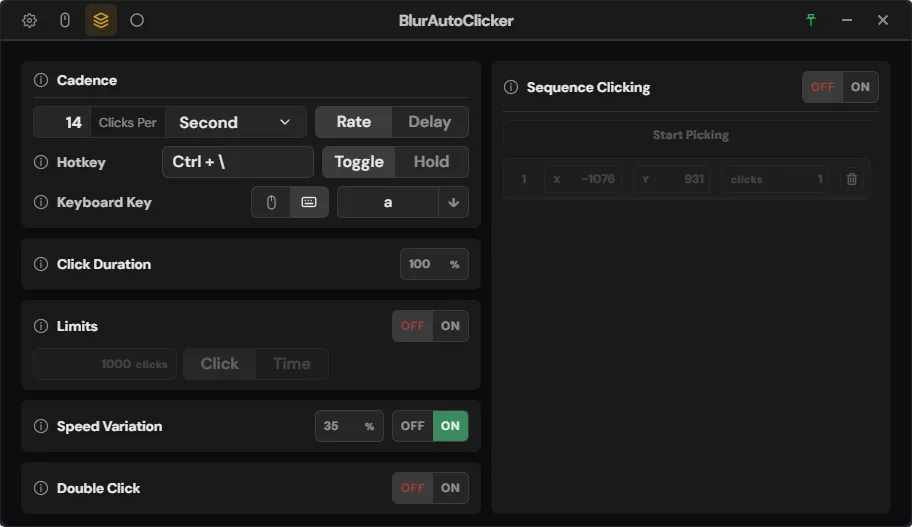
To repeat a key with Blur Auto Clicker, switch the Simple page from Mouse to Keyboard, click the key box and press the key to send. Start and stop with the hotkey (Ctrl + Y by default). A case button sends lower or upper case, and Duty Cycle set to Hold makes the key repeat like a held-down key.
How do I make Blur Auto Clicker press a key?
- Open the Simple page. Press 1 in the app window, or click the Simple tab.
- Choose Keyboard. Click the Keyboard button beside Mouse; the Left, Middle and Right choices change to a key box.
- Set the key to send. Click the key box and press the key; use the case button beside it for upper case.
- Keep the hotkey different. Make sure the start and stop hotkey does not include the key being sent; the app marks the two fields as conflicting.
- Test in Notepad. Click into an empty Notepad window, start for one second, stop, and count the characters.
Which keys can Blur Auto Clicker send?
Keyboard mode sends one chosen key over and over at the rate on the Simple page. Letters and numbers work, modifier keys, Esc and Return have been accepted since version 3.8.1, and the 3.9.5 changelog fixed the held-key behavior. Letters go out in lower case unless you press the case button. The key reaches whichever window has focus, so click into the target before you press the hotkey.
How do I hold a key down instead of tapping it?
Set Duty Cycle to Hold, or to 100%, in keyboard mode. The app then presses the key once and repeats it at the Windows keyboard repeat rate, the same way a key you physically hold behaves. That fits games and editors that read a held key; a 45% duty cycle, the default, sends separate presses instead.
Why does nothing appear when keyboard mode runs?
The usual cause is focus. Blur Auto Clicker sends keys to the active window, so if the app window itself is in front, the keys go nowhere useful. Click into the target first, then press the hotkey. If the target is a program running as administrator, a normal-user clicker cannot send input to it; Windows blocks that on purpose. Games that read raw input may also ignore synthetic key presses.
| Mouse mode | Keyboard mode | |
|---|---|---|
| Default on a new install | Yes, left button | No key set |
| What it sends | Left, middle or right click | One chosen key |
| Position options | Current pointer or Click Points | Not used; keys go to the focused window |
| Hold behavior | Button stays pressed | Windows key repeat |
| Case control | Not applicable | Lower (default) or upper |
Frequently asked questions
Can Blur Auto Clicker type a word or a key sequence?
No. Keyboard mode repeats a single key at the chosen rate. Typing a word, a sentence or several different keys in a set order needs a scripting or macro tool instead of an auto clicker.