Short answer
A new Blur Auto Clicker install clicks 25 times per second, with Speed Randomization (35%) and Duty Cycle (45%) already switched on. Type a new number in the rate box on the Simple page and choose Second, Minute, Hour or Day under Clicks Per. The normal ceiling is 500 clicks per second.
How do I set the click speed?
- Open the Simple page. Press 1 in the app window, or click the Simple tab.
- Type the rate. Click the rate box, replace 25 with the number you want, and press Enter.
- Choose the time unit. Under Clicks Per pick Second, Minute, Hour or Day; switch Rate to Interval to type hours, minutes, seconds and milliseconds instead.
- Turn off randomization for an exact rate. Switch Speed Randomization off when every gap between clicks must be identical.
- Add a limit and test. On the Advanced page set a click or time limit, then run once on a blank window and read the result in the status bar.
What click speed does Blur Auto Clicker start with?
The first run uses 25 clicks per second, which is the same as an interval of 40 milliseconds, according to the settings schema in 3.9.6. The Rate and Interval switch only changes how you type the value. Minute, Hour and Day units suit slow jobs such as one click every five minutes, which is easier to enter as 12 per hour than as a tiny decimal per second.
Why is my click rate not exactly the number I typed?
Speed Randomization is on by default at 35%, so each gap between clicks varies around your rate on purpose. Switch it off on the Simple or Advanced page when you need a steady rhythm. Duty Cycle, on at 45%, sets how much of each click cycle the button stays pressed, and it does not change the rate. At very high speeds the target program can also drop events that Windows delivered, so count results in the target, not in the clicker.
Why is the speed limited to 500 clicks per second?
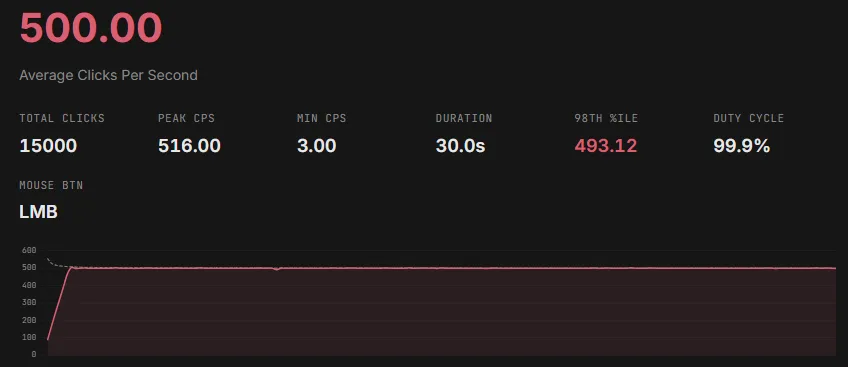
The developer explains in the README FAQ that Windows handles roughly 500 mouse events per second reliably, even though its timer can reach about 1000. The rate box therefore stops at 500. Extended Click Speed Limit under Settings, Behavior raises the ceiling to 1000, and the app asks for confirmation first. The 3.9.5 changelog adds that rates above 500 are not accurate, so treat the extended range as an experiment.
How do I make a run stop by itself?
The Limits card on the Advanced page holds two automatic stops that are off by default. A click limit starts at 1,000 clicks when you switch it on, and a time limit starts at 60 seconds with seconds, minutes or hours as the unit. Whichever limit arrives first ends the run, and the status bar shows the reason. Keep the hotkey as your manual stop even with a limit set.
| Setting | Default | Allowed range |
|---|---|---|
| Click speed | 25 per second | 1 to 500, or 1000 with the extended limit |
| Clicks Per unit | Second | Second, Minute, Hour, Day |
| Speed Randomization | On, 35% | 0 to 200% |
| Duty Cycle | On, 45% | 0 to 100%, or Hold |
| Click limit | Off (1,000 when on) | 1 to 100,000,000 clicks |
| Time limit | Off (60 s when on) | Seconds, minutes or hours |
Frequently asked questions
What is the fastest Blur Auto Clicker can click?
The normal maximum is 500 clicks per second. An extended setting under Settings, Behavior allows 1000, but the developer states in the changelog that rates above 500 are not accurate on Windows.